RESEARCHED DEFINITION (provide
short internet researched definition and URL link)
|
DESCRIBE THE RELEVANCE OF THE
RESEARCHED TERM TO YOUR OWN PRODUCTION PRACTICE?
|
IMAGE SUPPORT (Provide an image
and/or video link of said term being used in a game)
| ||
VIDEO GAMES / VIDEO GAME
TESTING
|
Demo
|
Demo's in games are samples of a game that are released to the public that show some features off from the full game which attempts to make the person playing the game want to purchase the full version of the game so they can experience all that the game has to offer. This is relevent because when I complete my 3D level, it will be more like a demo rather than a full game because there won't be many things to do within the level but it shows an area and a few things that are in the game.
| ||
Beta
|
https://www.techopedia.com/definition/27136/beta-test-gaming
"A beta test refers to the distribution of pre-release game software to a select group of people so that they can test the game in their own homes." |
A beta within a game is an early but almost complete version with small amount of bus and only a few finishing touches to add to the game. Beta tests are used to find out hidden bugs and to make sure the game flows smoothly. This is relevant because my game will have a beta version where I can freely test the game to find relevant bugs and other things that need to be fixed for my game.
|  | |
Alpha
|
http://www.webopedia.com/TERM/A/alpha_version.html
"A very early version of a software product that may not contain all of the features that are planned for the final version." |
An alpha version of a game is a very early version with many features missing and they are filled with many more bugs. This is relevant because my game is practically at this stage where I could improve it a lot in areas such as art, sound and mechanics.
|  | |
Pre-Alpha
|
https://en.wiktionary.org/wiki/pre-alpha_version
"A development status given to a program or application that is usually not feature complete, and is not usually released to the public. Developers are usually still deciding on what features the program should have at this status. This status comes before the alpha version, and is the first status given to a program." |
A Pre-Alpha version of a game is the stage before the Alpha. I think that my game is slightly past the Pre-Alpha stage as my game used to not have every single aspect in it where everything was completed and working fluently without errors.
| ||
Gold
|
http://www.urbandictionary.com/define.php?term=Gone%20Gold
"A game has "Gone Gold" when the final master copy has been produced at the developer and sent off for replication, packaging and shipment. " |
This is relevant because if I were to publish the game I have created, my game would have practically "Gone Gold" but I haven't published it because it isn't really updated enough or original for me to publish it and make it an actual game.
| ||
Debug
|
http://searchsoftwarequality.techtarget.com/definition/debugging
"In computers, debugging is the process of locating and fixing or bypassing bugs (errors) in computer program code or the engineering of a hardware device. " |
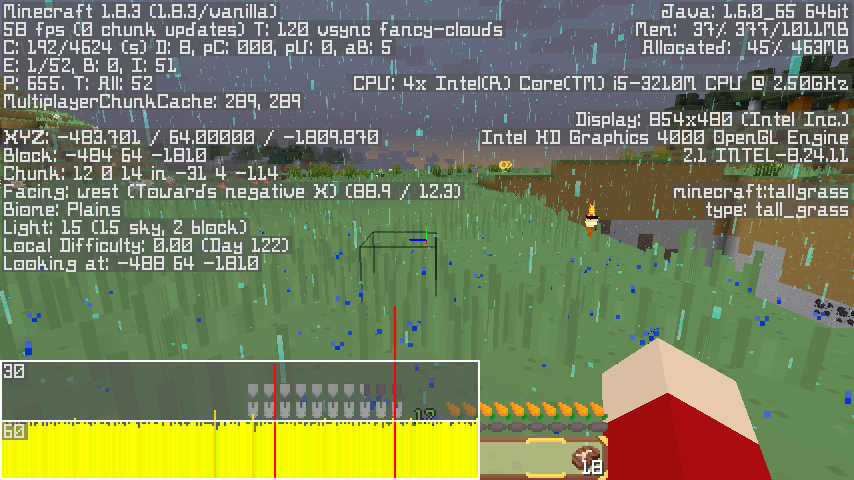
This is relevant because the debug can help me show things easily which I wouldn't usually be able to see, such as an entity count which can help me figure out if too many entities are being created causing lag and freeze issues.
| ||
Automation
|
http://www.merriam-webster.com/dictionary/automation
"The technique of making an apparatus, a process, or a system operates automatically." |
This is relevant because the enemies in my game are controlled by the AI so that they can attack my character.
| ||
White-Box Testing
|
https://en.wikipedia.org/wiki/White-box_testing
"White-box testing (also known as clear box testing, glass box testing, transparent box testing, and structural testing) is a method of testing software that tests internal structures or workings of an application, as opposed to its functionality (i.e. black-box testing)." |
This is relevant because I can use this tot test the internal structures or workings of my game.
| ||
Bug
|
https://en.wikipedia.org/wiki/Software_bug
"A software bug is an error, flaw, failure or fault in a computer program or system that causes it to produce an incorrect or unexpected result, or to behave in unintended ways." |
A bug can be referred to as a glitch, which is an error that occurs when testing or playing a game where something doesn't function properly. MY game will most likely contain bugs that I will need to fix for my game to work smoothly.
| ||
GAME ENGINES
GAME ENGINES
|
Vertex Shader
|
https://www.opengl.org/wiki/Vertex_Shader
"The Vertex Shader is the programmable Shader stage in the rendering pipeline that handles the processing of individual vertices. Vertex shaders are fed Vertex Attribute data, as specified from a vertex array object by a drawing command." |
I can use this to produce a high quality render of a model that I could create in programs such as Blender.
| |
Pixel Shader
|
http://www.webopedia.com/TERM/P/Pixel_Shader.html
"The name used to describe the method in which a GPU applies textures and renders pixels to the display. Pixel Shaders are used to give a more realistic look to objects, such as reflections." |
I can use this in my game to make it look more realistic by adding new effects such as shadows and better quality lighting.
| ||
Post Processing
|
https://en.wikipedia.org/wiki/Video_post-processing
"The term post-processing (or postproc for short) is used in the video/film business for quality-improvement image processing (specifically digital image processing) methods used in video playback devices, (such as stand-alone DVD-Video players), and video players software and transcoding software. It is also commonly used in real-time 3D rendering (such as in video games) to add additional effects." |
This can make my level look better as the quality would be improved a lot which would make my game also look more realistic which is something I aim to achieve.
| ||
Rendering
|
https://en.wikipedia.org/wiki/Rendering_(computer_graphics)
"Rendering is the process of generating an image from a 2D or 3D model (or models in what collectively could be called a scene file) by means of computer programs. Also, the results of such a model can be called a rendering." |
I rendered multiple images from Blender of models that I have created by myself. I have made these renders look nicer by adding lighting to make light and shadows make it look more realistic.
| ||
Normal Map
|
https://en.wikipedia.org/wiki/Normal_mapping#Normal_mapping_in_video_games
"In 3D computer graphics, normal mapping, or "Dot3 bump mapping", is a technique used for faking the lighting of bumps and dents – an implementation of bump mapping. It is used to add details without using more polygons. " |
I have used some normal maps on my textures to give them effects that make them look more 3D as if they are coming out of the object. This makes my work look better because it look more realistic and generally better.
| ||
Entity
|
https://en.wikipedia.org/wiki/Entity_component_system#Game_example
"Entity-component-system (ECS) is an architectural pattern that is mostly used in game development. An ECS follows the Composition over inheritance principle that allows greater flexibility in defining entities where every object in a game's scene is an entity (e.g. enemies, bullets, vehicles, etc.)." |
In my 2D game, entitites are present because of the things within it such as my enemies, weapons and power-ups.
| ||
UV Map
|
https://en.wikipedia.org/wiki/UV_mapping
"UV mapping is the 3D modeling process of projecting a 2D image to a 3D model's surface for texture mapping." |
I have used some UV maps on my textures to make them look more realistic and 3D and I think that they worked pretty well and made my work look a lot better after adding them.
| ||
Procedural Texture
|
https://en.wikipedia.org/wiki/Procedural_texture
"A procedural texture is a computer-generated image created using an algorithm intended to create a realistic surface or volumetric representation of natural elements such as wood, marble, granite, metal, stone, and others, for use in texture mapping." |
I have used this in my level to make realistic textures that will make my game look better and not make it lag as much as if I were to create it from scratch.
| ||
Physics
|
https://en.wikipedia.org/wiki/Game_physics
"Computer animation physics or game physics involves the introduction of the laws of physics into a simulation or game engine, particularly in 3D computer graphics, for the purpose of making the effects appear more real to the observer." |
My 3D level has basic physics in there as my player can fall and as they fall, the rate of the fall increases. My player can also jump and they will slowly start to come back down just like in real life.
| ||
Collision
|
https://en.wikipedia.org/wiki/Collision_detection
"Collision detection typically refers to the computational problem of detecting the intersection of two or more objects. While the topic is most often associated with its use in video games and other physical simulations, it also has applications in robotics." |
I have used collision in things such as my 2D game so it is precise when a character loses health because I had to change this manually as the collsion area was a box and not accurate.
| ||
Lighting
|
http://www.merriam-webster.com/dictionary/lighting
"An artificial supply of light or the apparatus providing it." |
I have used lighting my my 3D level to make areas look nice with a lighting effect and I have also used it to make areas where the environment looked glitchy with things such as shadows and the lighting helped me fix this problem as I can now see the textures again fine.
| ||
AA – Anti-Aliasing
|
www.webopedia.com/TERM/A/antialiasing.html
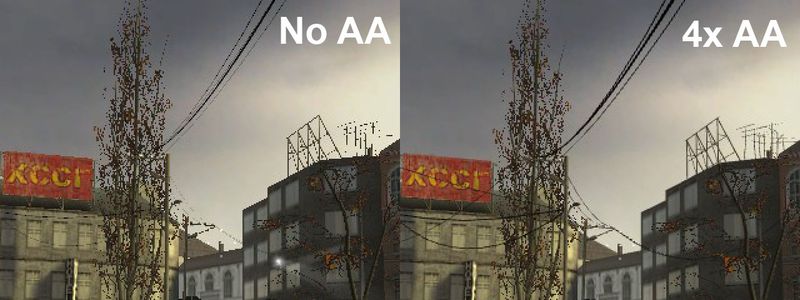
"In computer graphics, antialiasing is a software technique for diminishing jaggies - stairstep-like lines that should be smooth. Jaggies occur because the output device, the monitor or printer, doesn't have a high enough resolution to represent a smooth line." |
This would be useful as it would remove jagged edges in my game to make my game look a lot nicer and realistic since the jagged edges won't show that my game is obviously a game because the jagged edges are not realistic.
| ||
LoD – Level of Detail
|
https://en.wikipedia.org/wiki/Level_of_detail
"In computer graphics, accounting for Level of detail involves decreasing the complexity of a 3D object representation as it moves away from the viewer or according to other metrics such as object importance, viewpoint-relative speed or position." |
The LoD can help my game in many ways. If it is lower, my game will run more smoothly but with lower quality but if I had the LoD at a higher rate, then My game would look a lot nicer but perform a lot worse since the PC will be focusing on showing the high quality 3D models.
| ||
Animation
|
www.yourdictionary.com/3d-animation
"3D animation - Computer Definition. Animating objects that appear in a three-dimensional space. They can be rotated and moved like real objects. 3D animation is at the heart of games and virtual reality, but it may also be used in presentation graphics to add flair to the visuals." |
I have animated things in my game such as the sprites I have created. The animation is very simple as it only consists of 2 frames but I think that it looks rather nice and since the frame rate is so low, it doesn't effect my game in any lagging issues.
| ||
Sprite
|
http://www.thefreedictionary.com/sprite
"(Games, other than specified) an icon in a computer game which can be manoeuvred around the screen by means of a joystick, etc" |
I have created Sprites in my 2D game to so the player can see what everything looks like such as the characters, weapons etc.
| ||
Scene
|
http://docs.unity3d.com/Manual/CreatingScenes.html
"Scenes contain the objects of your game. They can be used to create a main menu, individual levels, and anything else. Think of each unique Scene file as a unique level. In each Scene, you will place your environments, obstacles, and decorations, essentially designing and building your game in pieces." |
I have used scenes in my game to make things for my level as I place things like objects and assets into it so that I could put everything together to make my level.
| ||
Library
|
http://searchsqlserver.techtarget.com/definition/library
“In computing, a library is a collection of similar objects that are stored for occasional use - most frequently, programs in source code or object code form, data files, scripts, templates, fonts, and physical storage units such as tape cartridges. Here are some common types of libraries.” |
I have used a library to locate where all the things I need such as assets and scripts are located so I can easily find them and use them in my game.
|  | |
UI
|
http://www.webopedia.com/TERM/U/user_interface.html
“Abbreviated UI, the junction between a user and a computer program. An interface is a set of commands or menus through which a user communicates with a program. A command-driven interface is one in which you enter commands. A menu-driven interface is one in which you select command choices from various menus displayed on the screen.” |
I have created my own UI in my 2D game which was rather simple to do as it was only creating the healthbar for my player and enemies.
|  | |
Frames
|
https://en.wikipedia.org/wiki/Frame_rate
"Frame rate, also known as frame frequency, is the frequency (rate) at which an imaging device displays consecutive images called frames. The term applies equally to film and video cameras, computer graphics, and motion capture systems. Frame rate is usually expressed in frames per second (FPS)." |
Frame rate is important because it shows how smoothly the game runs and it makes it look more realistic and clear. Since the computer I used to make my game isn't the best, I have used more low quality textures and assets so that my game doesn't lag.
|  | |
Concept
|
https://en.wikipedia.org/wiki/Concept_art
"Concept art is a form of illustration used to convey an idea for use in films, video games, animation, comic books or other media before it is put into the final product.[1] Concept art is also referred to as visual development and/or concept design.[2] This term can also be applied to retail, set, fashion, architectural and industrial design.[3]" |
I have created certain concepts such as art for things such as my characters as I design how I wanted them to look and chose out of the best ideas which I thought was the best that suited my game.
|  | |
Event
|
http://www.webopedia.com/TERM/E/event.html
“An action or occurrence detected by a program. Events can be user actions, such as clicking a mouse button or pressing a key, or system occurrences, such as running out of memory. Most modern applications, particularly those that run in Macintosh and Windows environments, are said to be event-driven, because they are designed to respond to events.” |
I have used events in my construct game to command what I want my character to do and how I want the game to function. It is mostly based off of using things such as mathematical equations to calculate when an enemy should die etc.
| ||
Pathfinding
|
https://en.wikipedia.org/wiki/Pathfinding
“Pathfinding or pathing is the plotting, by a computer application, of the shortest route between two points. It is a more practical variant on solving mazes. This field of research is based heavily on Dijkstra's algorithm for finding a shortest path on a weighted graph.” |
I have used this in my 2D game as my enemies will find the best way to run and collide into my player so they have a better chance of hitting them in the quickest way without taking any long routes.
|
Showing posts with label Task 1 The Purposes and Functions of Components of Game Engines. Show all posts
Showing posts with label Task 1 The Purposes and Functions of Components of Game Engines. Show all posts
Task 1 The Purposes and Functions of Components of Game Engines






Subscribe to:
Posts (Atom)